Guide the work
Make the next action clear based on the repair.
A Dell warranty workflow that started as an integration problem and evolved into a guided repair system.

Opportunity
Dell warranty repairs were new territory for store technicians. The program had its own eligibility rules, warranty states, and approval process.
None of it was familiar, and none of it lived inside the tools they already used.
Discovery
We knew the experience would evolve beyond the first release, but we did not yet know where the biggest gaps would be. I started by looking at how Portal, the POS system that the stores run on, already supported other partner programs, then worked with Operations to understand how technicians moved through those workflows in stores.
For the first phase, Portal needed to recognize an eligible Inspiron device, verify its warranty, and put the technician on the right repair path. From there, the technician would swivel chair into TechDirect for approval, then return to Portal to complete the repair.

First release
Most partner repairs arrived through an existing claim. Dell didn't, so technicians had to identify the right path from the device itself.
The service tag became the entry point. For eligible Dell Inspiron devices, we surfaced the warranty state and the Dell-specific repair path.


Service tag and warranty state surfaced during check-in.
In-warranty and expired devices followed different paths.


The work order showed when Dell approval was required.
I brought the first experience to our company-wide uBreakiFix Design Summit, where franchise teams, corporate stores, and Dell could react to the same workflow in person. Their feedback helped us tighten the experience before rollout.

After launch
Once the workflow was in stores, we started seeing delays in getting repairs approved. TechDirect left too much open to interpretation, so technicians had to figure out how to document the repair well enough for approval.
One Operations partner had already created a troubleshooting template to give technicians more structure. That workaround pointed us toward a more guided experience.
V2
The next iteration focused on one outcome: helping technicians get the dispatch approved. I wanted to leave as little as possible up to interpretation, so the workflow made the required evidence clear as they worked.
Portal then turned that information into structured text that prefilled the TechDirect fields technicians would otherwise complete manually.
Before rollout, I tested the guided troubleshooting flow with a couple of technicians in one corporate store to confirm the structure actually reduced ambiguity instead of just relocating it.
Make the next action clear based on the repair.
Capture the evidence needed for approval as the technician works.
Make status, review, and recovery visible in Portal.

I used an AI-powered prototype to make the approval experience tangible before moving into detailed Portal design. It helped Product and Engineering align on the flow and conditional logic before we committed to the UI.
Technicians selected the issue first, which determined what troubleshooting, evidence, and parts appeared next.

Dell's required troubleshooting became structured steps. If a step could not be completed, the technician explained why.
Diagnostic results like ePSA codes were captured directly in the flow, with exceptions documented when a test could not be completed.


Technicians could search and select the part needed for the repair without leaving the experience.
Photo requirements were tied to the repair so technicians knew exactly what evidence Dell needed.


Technicians could review the full submission before sending it, then see rejection status and reasons if approval failed.
Platform Strategy
The Dell workflow was arriving during a platform transition. Legacy Portal still powered most stores, while Next Gen Portal was beginning to roll out across the network.
We used the Bridge Method to bring Next Gen patterns and components into Legacy where they fit, so we could ship the experience now without creating something we would need to redesign as stores moved to the new platform.
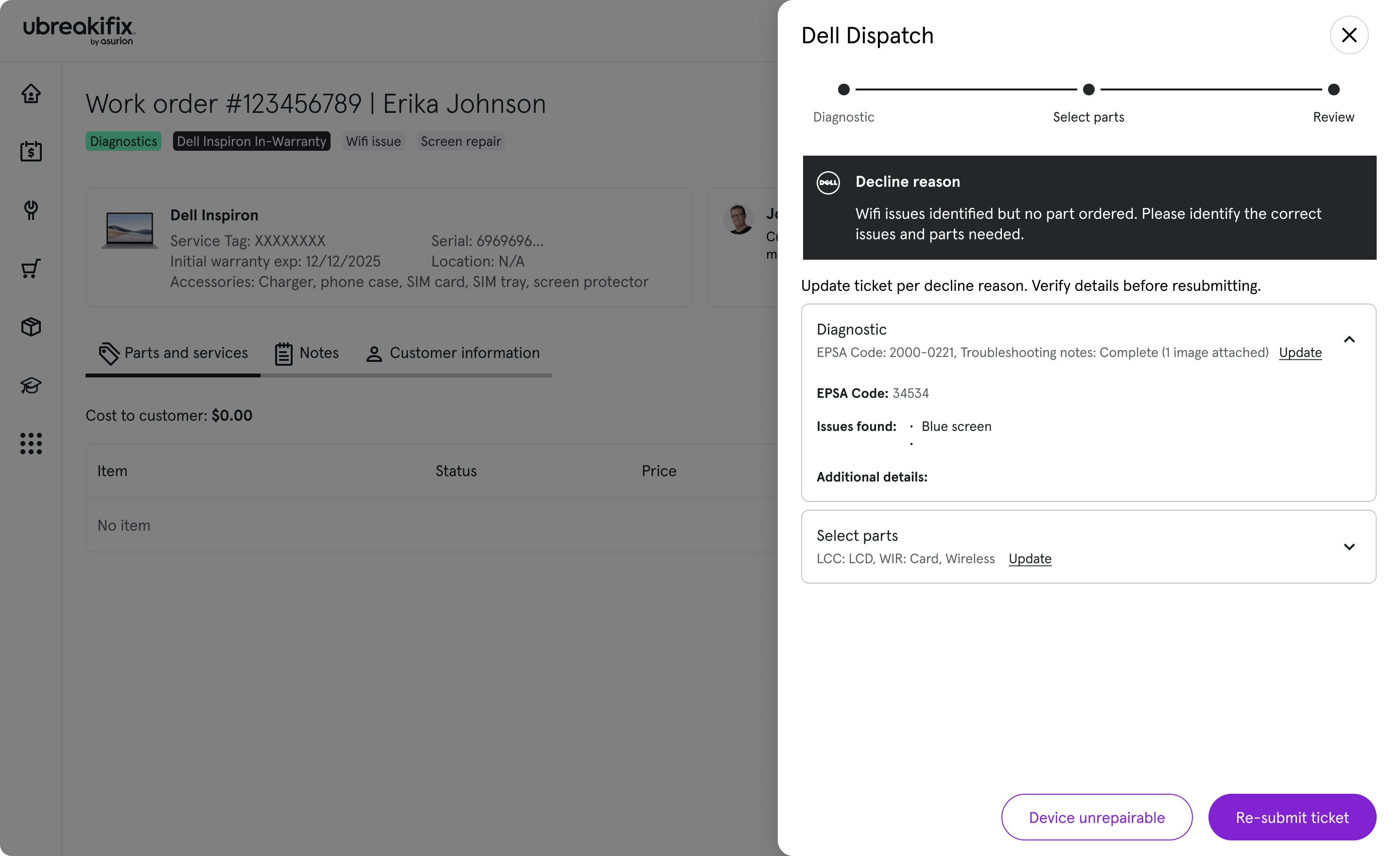
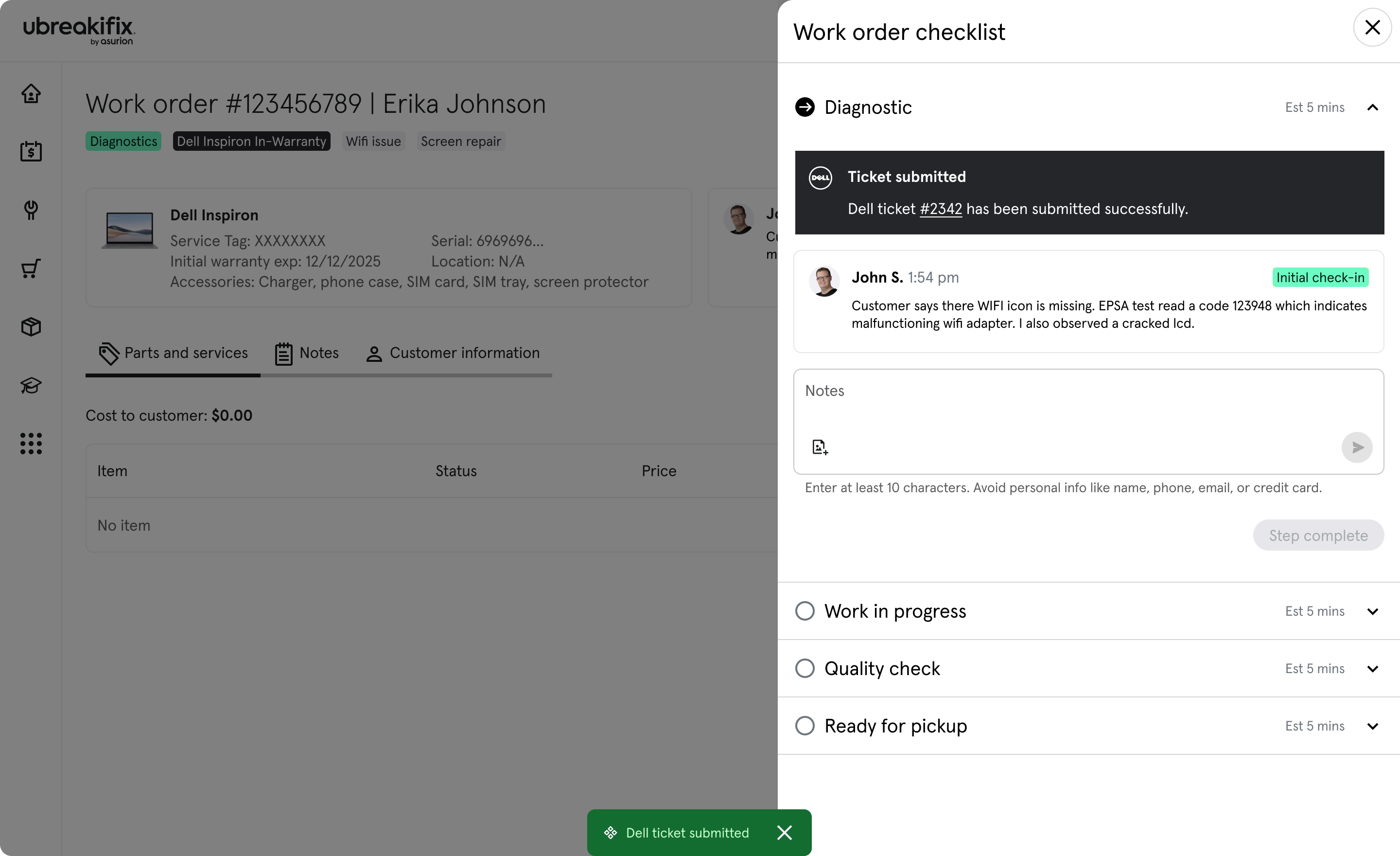
The final workflow moved the dispatch process out of open text and into a guided experience inside Portal. It reduced the amount of manual handoff work, made approval requirements clearer, and created patterns and capabilities that could be reused beyond this program, including a photo uploader that shipped here first.
100%
Swivel chair removed from the dispatch submission flow
20+
Manual fields eliminated or prefilled from information already captured in Portal
1
Reusable guided approval pattern that could be applied to other partner experiences
The gaps between our platform and the partner process pushed us to be more strategic about what we could control. By structuring the work on our side, we created a better technician experience and a stronger handoff into Dell's approval process.
Contact
Open to senior product design roles focused on enterprise systems and operational software.
© 2026 Michael Brooks