Michael Brooks
Back to work
Enterprise UXWorkflow DesignService Blueprinting

From Fragmented Tools to Guided Workflow

A guided repair-ordering workflow inside the POS platform—built for technician execution and ordering-team processing—supporting rollout to 100+ stores.

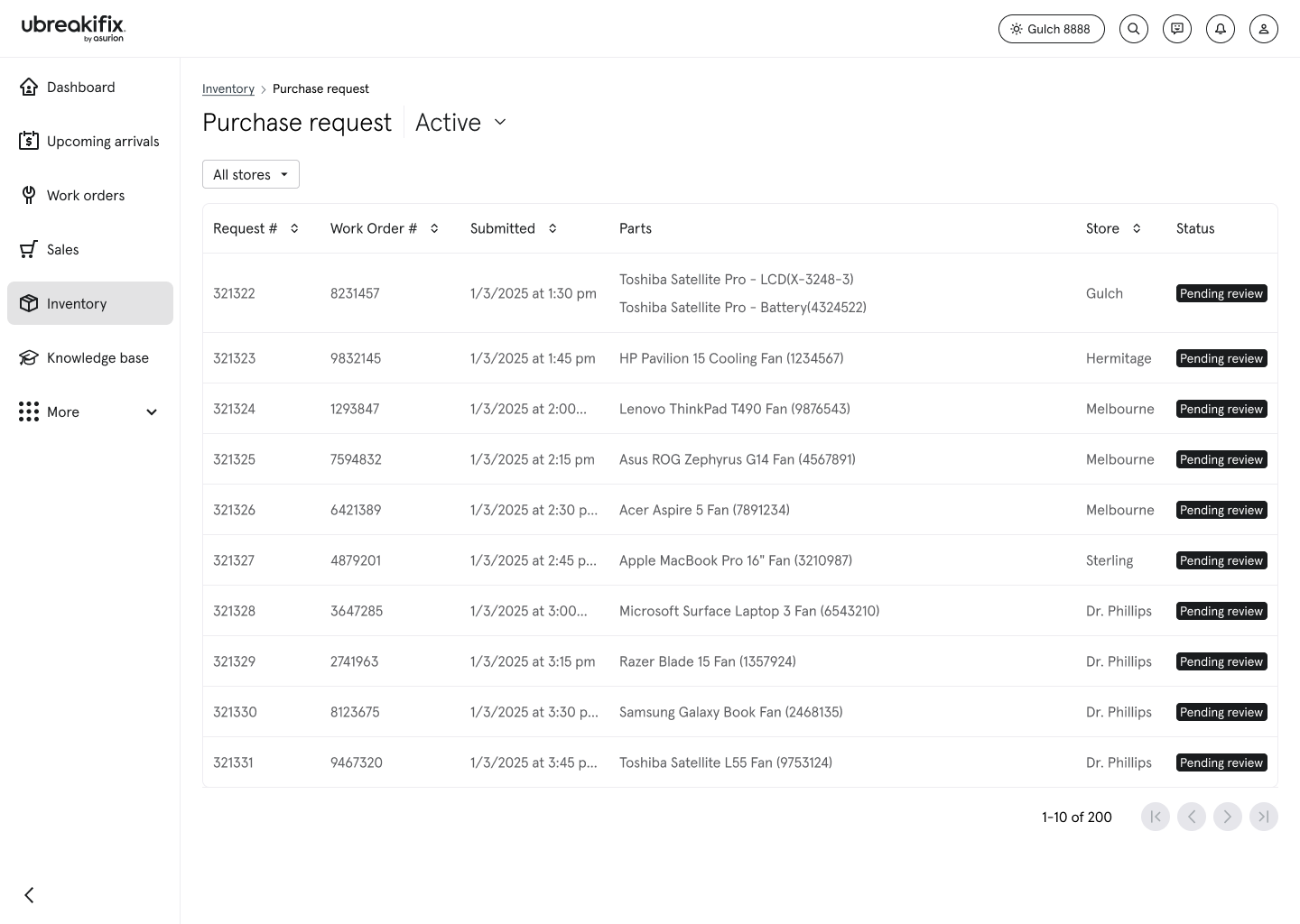
Purchase request queue with requests pending specialist review
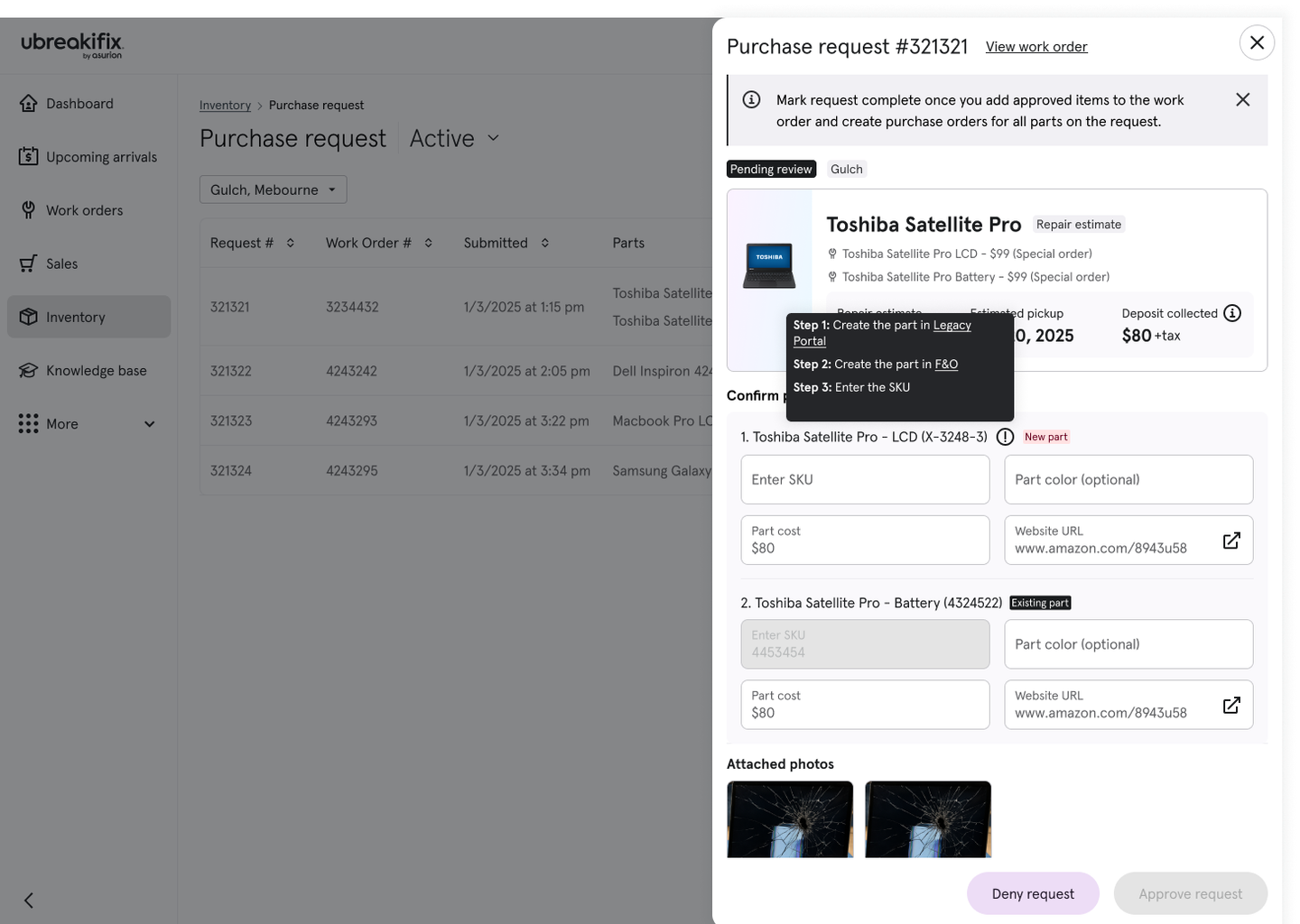
Purchase request detail panel for triage and approval
Role
Product Designer II, Asurion / uBreakiFix
Team
Core squad of 4 + partner teams (Estimates, Inventory/F&O)

I led design for a guided repair-ordering workflow inside the POS platform—built for technician execution and ordering-team processing—supporting rollout to 100+ stores. Scope spanned repair parts ordering, the ordering-team queue, and request status tracking.

Platform Context

Several systems set the stage for this work, and the relationships between them shaped every decision.

  • Legacy Portal — the current POS system. Finance, operations, and ordering all lived inside it.
  • Next Gen Portal — the replacement, currently rolling out to 100+ stores.
  • F&O (Finance & Operations) — the inventory and financial tracking system. Unlike Legacy where it was built in, F&O was intentionally kept separate in Next Gen, introducing new coordination requirements. It is a prerequisite for any part to be ordered, tracked, or tied to a work order.
  • Centralized Ordering Team — created because technicians ordering parts individually was too inconsistent. One team now handles all part requests across 700+ locations.

Why this project existed: The centralized ordering workflow needed to be rebuilt before Next Gen hit 100+ stores—and the existing process had serious enough problems that it couldn't just be carried forward.

Kickoff

The workflow didn't have a single owner. I joined a cross-functional workshop pulled together by the Stores product org, with the Next Gen portal team, the F&O inventory engineering team, Operations, and the centralized ordering team supporting 700+ stores.

It became obvious fast: this wasn't a simple “request form” problem—even responsibility for who orders wasn't consistently defined. The same failure modes kept surfacing:

  • Missing or inconsistent technician documentation
  • Wrong parts ordered due to unclear inputs
  • Communication delays that cascaded into order delays and repair delays

To ground the discussion in how inventory actually gets created, we walked through the F&O item creation process and aligned on the mandatory fields required to define an item correctly. The ordering team also shared the Excel tracker they relied on to verify part details, standardize naming, and check whether a part already existed before creating anything new.

Outputs from the workshop

  • F&O item definition: the required fields needed to create inventory correctly
  • Duplicate prevention baseline: a naming + verification approach already working in practice, anchored in the ordering team's tracker

Understanding the Current Process

After kickoff aligned the team on core constraints, work was divided into parallel streams—I owned the ordering side. I started where the problem was most visible: a focused working session with the centralized ordering team to watch the process in action and document who owned each step, which systems were involved, and where friction was introduced.

What I observed was a highly manual workflow:

  • Check a Power BI report twice a day to identify work orders needing parts
  • Open the work order and interpret technician notes
  • Cross-reference the Excel tracker to confirm whether an item already exists
  • If new, create the item across multiple systems
  • Place the order on the vendor site
  • Return to Next Gen to complete the purchase order steps
  • Update the work order manually and add the part to it
  • Leave a note letting the technician know the part was ordered
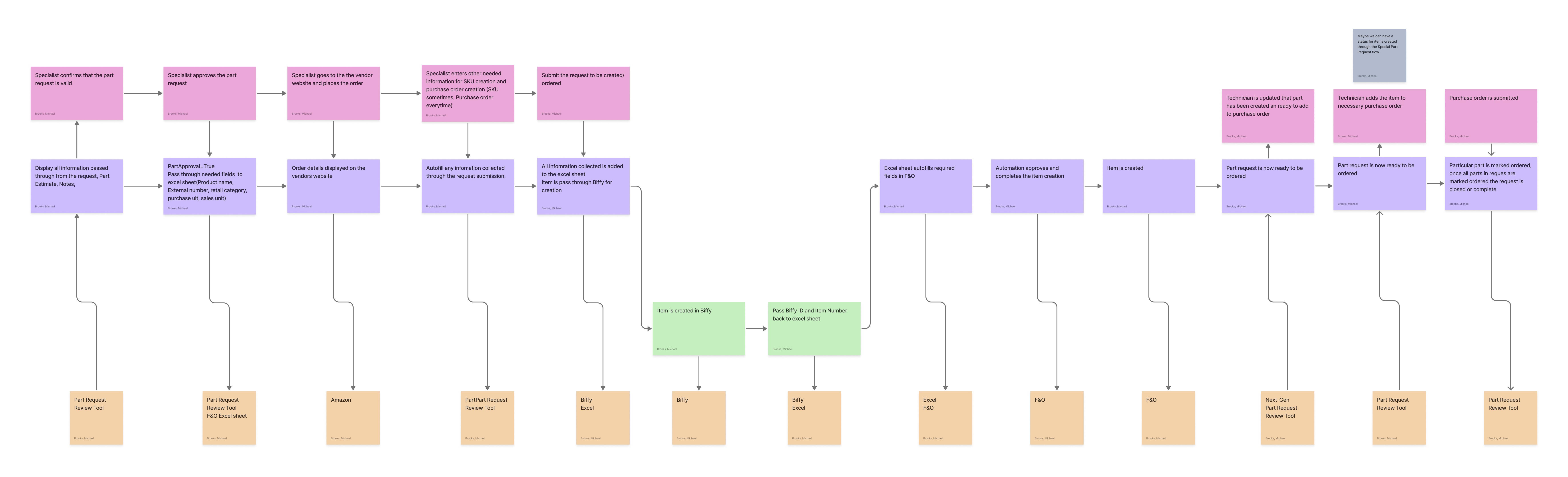
Current-state flow diagram — 3rd-party item creation
Add image later

One part request touched six separate systems. Data was manually re-entered at each step, with no automation or shared source of truth.

Where the Workflow Broke Down

Watching the process end-to-end made it clear the issue wasn't effort—it was that the workflow had no built-in structure to keep work moving cleanly. Three breakdowns showed up repeatedly.

1. At intake: the handoff wasn't structured

The technician → ordering handoff was a single free-text field. No required details, inconsistent photos, no structure. Result: requests arrived incomplete, and the ordering team had to do cleanup and follow-up before anything could move forward.

2. During review: there was no real-time pushback loop

When notes were unclear, the only path was a structured escalation chain—tagging the store lead in the district chat, then the District Manager if no response came by the next ordering window. Orders ran twice a day with a 2pm cutoff, and after three failed contact attempts the request could be pulled entirely. Result: requests stalled until someone manually chased the missing info, adding hours or even days of delay.

3. During fulfillment: there was no shared source of truth

The request lived across six disconnected systems, with manual re-entry and verification at every step. The Excel tracker helped, but naming conventions still drifted. Result: tracking was fragile, errors were easy to introduce, and duplicate SKUs still slipped through.

This wasn't about individuals doing a bad job—the workflow had no built-in structure to enforce completeness, handle exceptions, or prevent duplication. At 700+ stores, the ordering team was forced to absorb the gaps.

Proactive Exploration

While business and product were still aligning on final requirements, I used the constraints we already knew to get ahead.

  • Researched common patterns in work-order queues and request-management systems
  • Ran lightweight prototyping in v0 to start pressure-testing assumptions
  • Built an updated service blueprint to map where the system needed to do more of the work

These weren't final designs—they were working artifacts to clarify what information had to be captured to make requests actionable, and to show up to the next requirements conversation with a point of view.

Turning Constraints Into a Real Workflow

Discovery surfaced the symptoms. This is where we locked the mechanics—translating the workflow into step-level reality across systems, roles, and edge cases. I ran daily working sessions with Engineering and Content/IA to pressure-test the flow in real scenarios, walking a request end to end until we hit the questions that didn't have a clean answer yet.

  • Part identification — same part, different systems, different naming conventions. No clean lookup.
  • Inventory scope — corporate and franchise stores don't share the same search results, which shaped scope before a screen was designed.
  • SKU creation — if the part didn't exist, it had to be manually created in F&O before anything downstream could move.
  • The closed loop — once a PO was created, the system had to match it back to the request and update the work order; if that chain broke, nothing closed.
  • Manual ordering gap — vendor sites aren't integrated, so every external order had to be manually confirmed back in the system.
  • Async delays — after item creation there's a processing delay before the item can be used, with direct UX implications.

Validating what Next Gen could (and couldn't) abstract away

In Legacy, F&O was effectively embedded in the portal experience; in Next Gen it was intentionally kept separate, which meant our flow had to coordinate across products instead of assuming one unified system. I brought an early version of the proposed workflow to the F&O team to confirm what was viable, what had to stay manual, and what could be streamlined without compromising financial and inventory integrity.

  • F&O is the gate. If an item doesn't exist in F&O, downstream steps like POs can't proceed reliably.
  • SKU creation unlocks downstream workflows. Once created, the item can be added to a PO, enabling part tracking and status updates that roll into the work order.
  • Automation had limits (for now). Cross-system item creation wasn't a near-term automation opportunity—the experience had to design around manual dependencies.
  • Timing mattered. After creation, there's an async delay before the item can be searched or used—a technical reality with direct UX implications.

Converting constraints into decisions

To keep the work buildable and avoid scope creep, we maintained two lightweight artifacts in parallel: an assumption list (the conditions that had to hold for the workflow to function at scale) and a decision log (what we'd ship now vs. intentionally defer). The scope-shaping constraints we locked early:

  • Requests are tied to work orders and often include multiple parts
  • SKU creation is required before PO assignment and remains manual
  • Vendor ordering happens outside the system; status updates require deliberate confirmation
  • Actionable requests rely on auto-pulled work order context plus technician-provided evidence (URL/image) when a SKU doesn't exist

Those constraints directly shaped the workflow states we designed for: review → clarify → approve → create item (if needed) → order externally → confirm status. The output was an end-to-end flow spanning six phases: Check-in, Advanced Diagnostic, Price Estimate, Part Request, Request Processing, and Repair.

End-to-end flow — six phases
Check-in through repair: check-in, advanced diagnostic, price estimate, part request, request processing, and repair.

The Strategy: Designing for Alignment

After the workshop, I synthesized transcripts, system constraints, and early flow diagrams into a functional prototype in v0. The goal wasn't polished UI—it was alignment. The prototype turned abstract workflow questions into something the team could react to: instead of discussing the process in theory, we could point to the queue, request view, and status logic and ask what the ordering team needs first, what makes a request actionable, and where simple ordering ends and item creation begins. That helped us resolve three key decisions early.

  • Information density — defining the minimum information needed for specialists to triage requests without opening every work order.
  • Queue logic — separating simple orders from higher-touch item-creation requests so the team could prioritize work more clearly.
  • System latency — accounting for the delay between creating a SKU in F&O and that item becoming available in the POS experience.

Establishing the Entry Points

My early explorations focused on the Queue and Request View because these were the primary gateways into the centralized ordering workflow. Designing these surfaces first helped define ownership boundaries, identify where handoffs could break, and expose critical dependencies before engineering moved into production.

One of the biggest discoveries was the manual SKU creation gap. If an item did not already exist in F&O, the ordering team couldn't simply move forward with a purchase order. The queue experience had to make that dependency visible, separate those requests from simpler orders, and guide specialists toward the right next step.

Technician request flow

Work order context
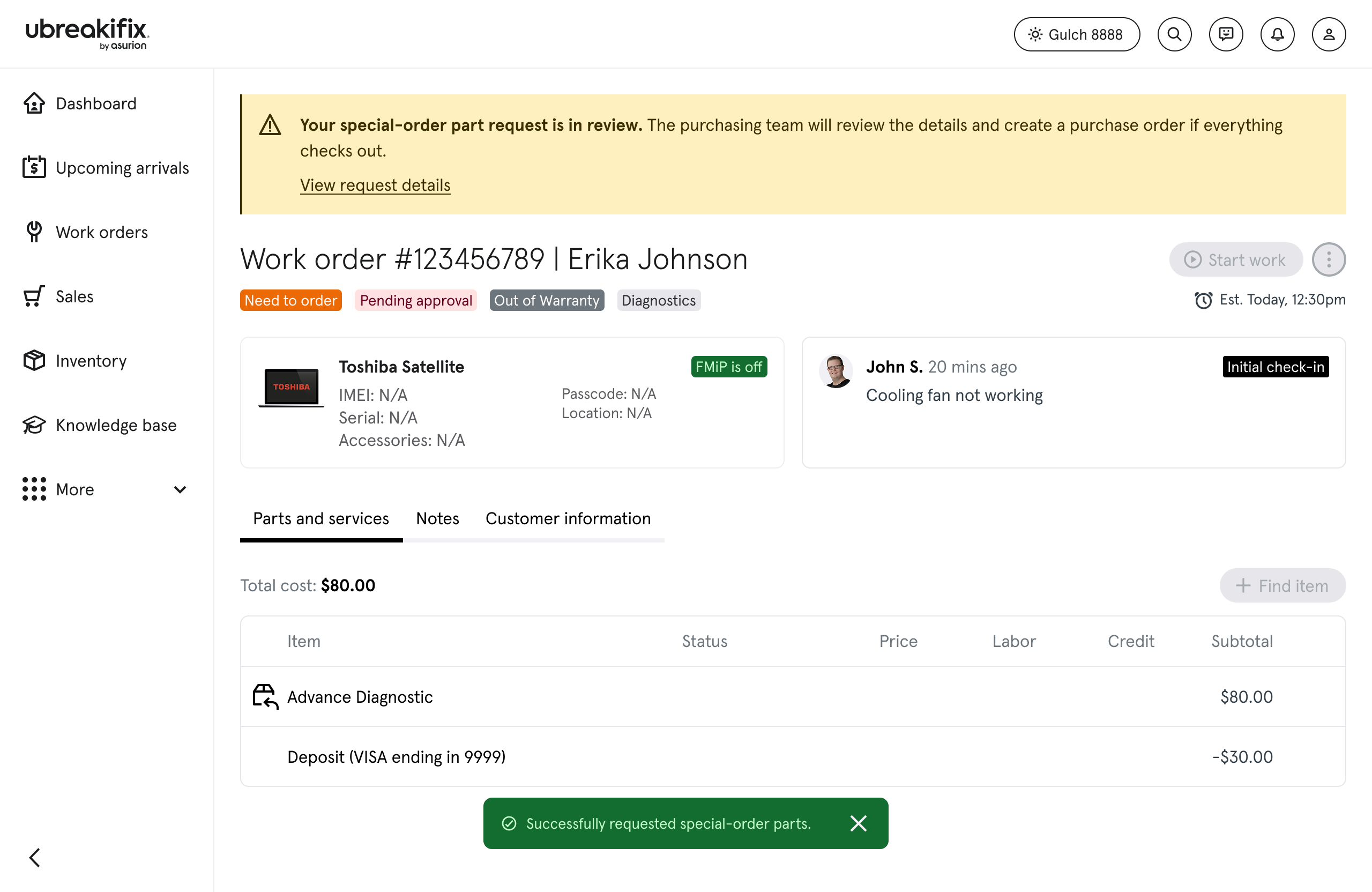
Technician starts from the work order before entering the parts request flow.
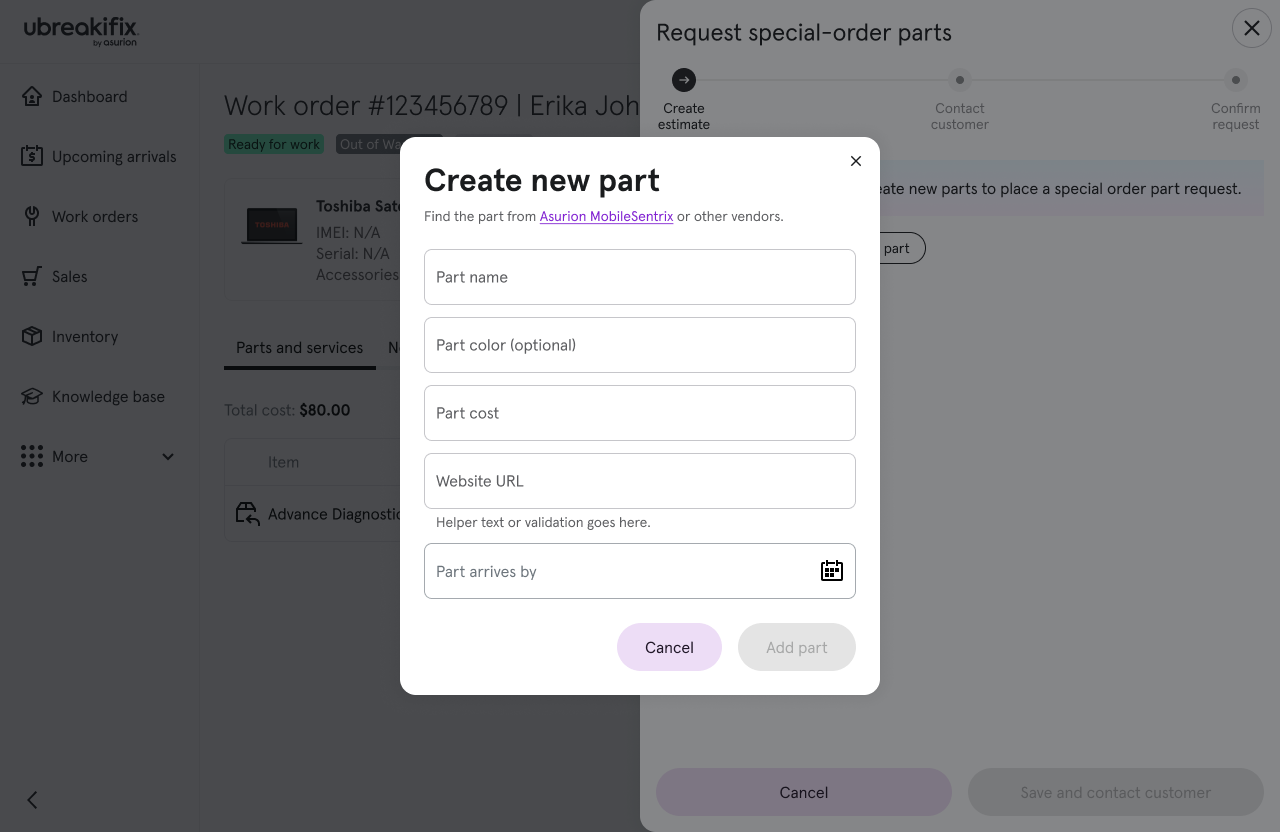
Find item — no results
When inventory has no match, the flow captures evidence needed for ordering-team review.
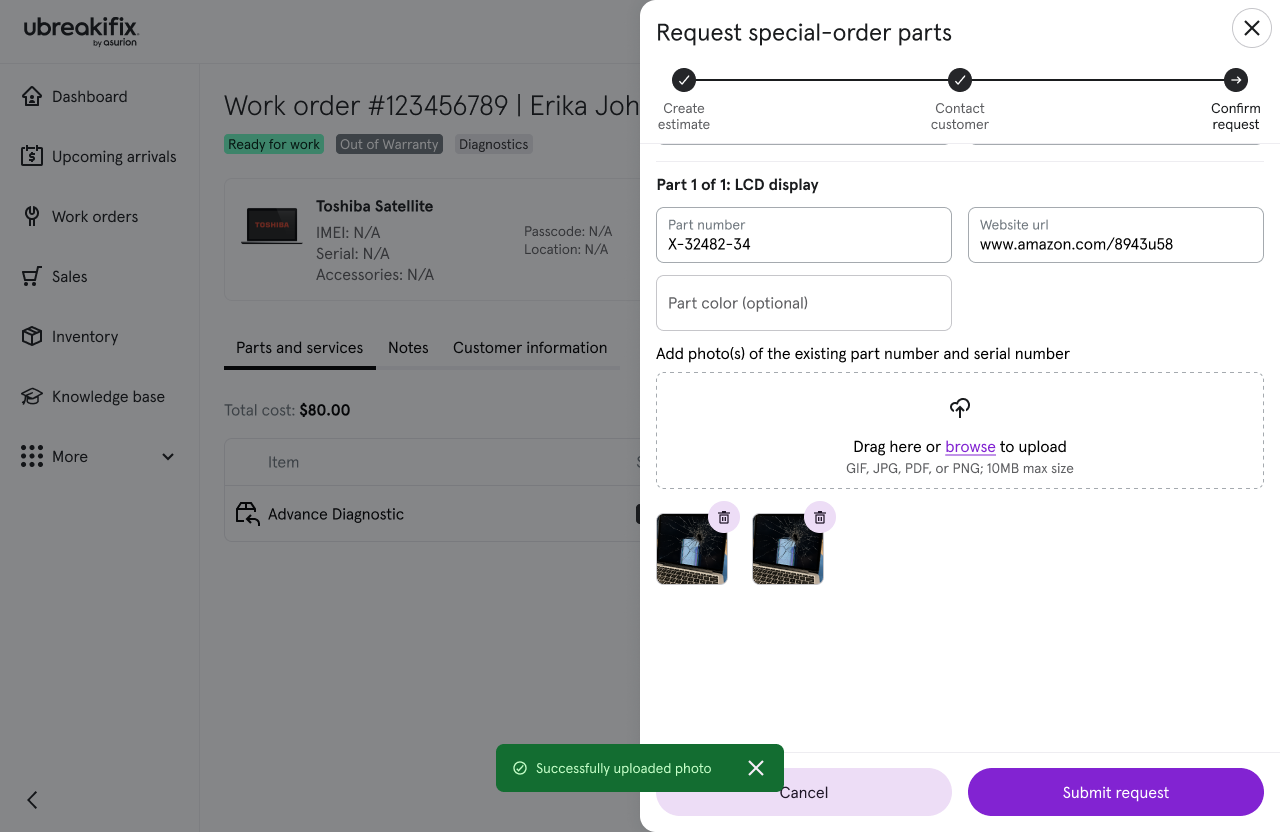
Confirm request
Structured request submission with photos and notes before handoff.
Pending approval — work order
After submit, the technician sees in-review status on the work order while the ordering team triages the request.
Approved — parts on work order
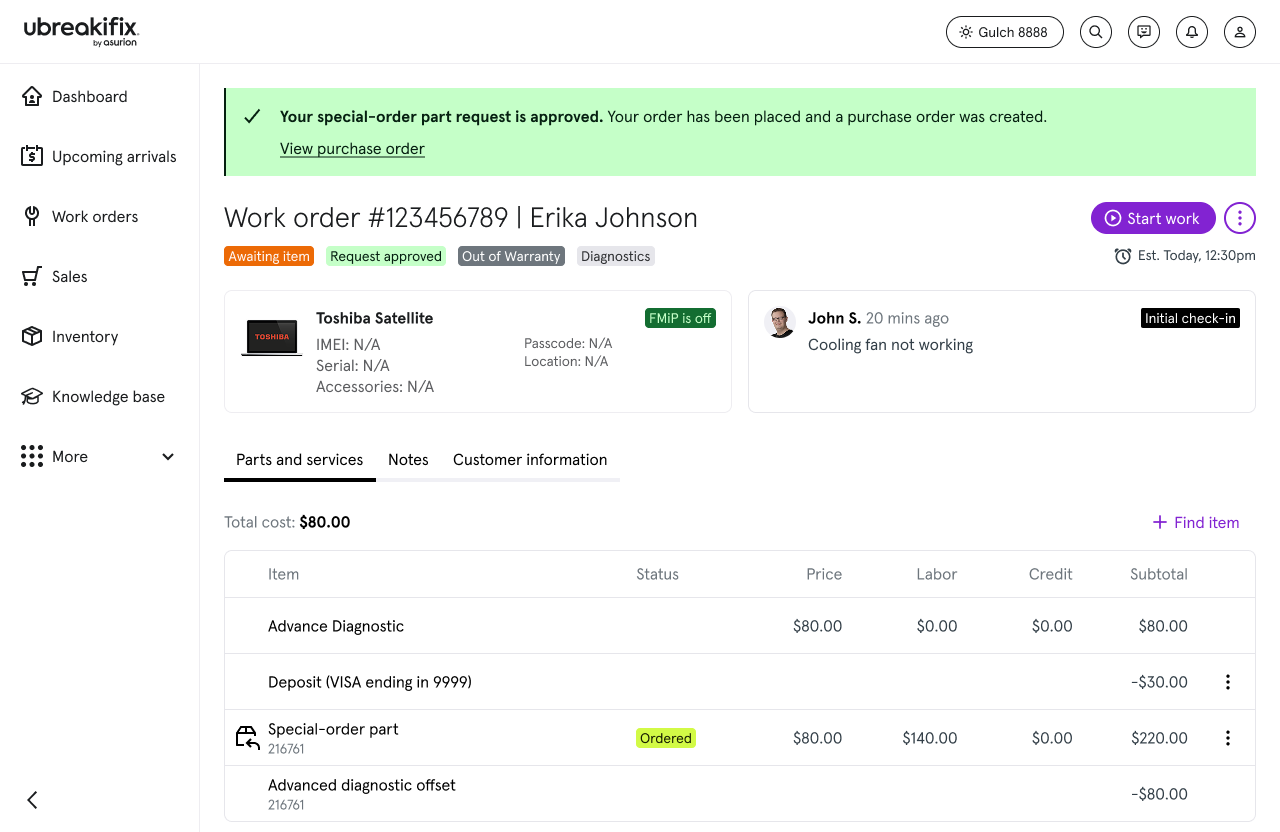
Once approved, parts appear on the work order with clear status for downstream ordering and repair.

Ordering team queue

Purchase request queue — active
Specialists triage incoming requests across stores with work order context, parts summary, and review status.
Request detail panel
Detail panel surfaces new vs. existing parts, SKU entry, technician evidence, and approve/deny actions in one place.
Queue — approved and complete
Approved requests in the queue with confirmation when a request is marked complete after fulfillment steps.

Contact

Let's work together

Open to senior product design roles focused on enterprise systems and operational software.

© 2026 Michael Brooks